There is a certain kind of Wordle that makes you feel like you already lost. You lock in most of the letters early, and then the puzzle just… sits there, daring you to guess which consonant it wants. You know the shape. You have no idea what fills the gap.
That is exactly the puzzle I want to walk through here, because it is the perfect excuse to show off the new board solver on WordleSolver.pro. Instead of translating your game into form fields, you rebuild the board the way you actually see it, tap the tiles to match, and press one button. Let me show you the whole thing, guess by guess.
The Puzzle That Would Not Cooperate
Here is my opening guess in the real game. I went with WORDY, and the board came back like this:
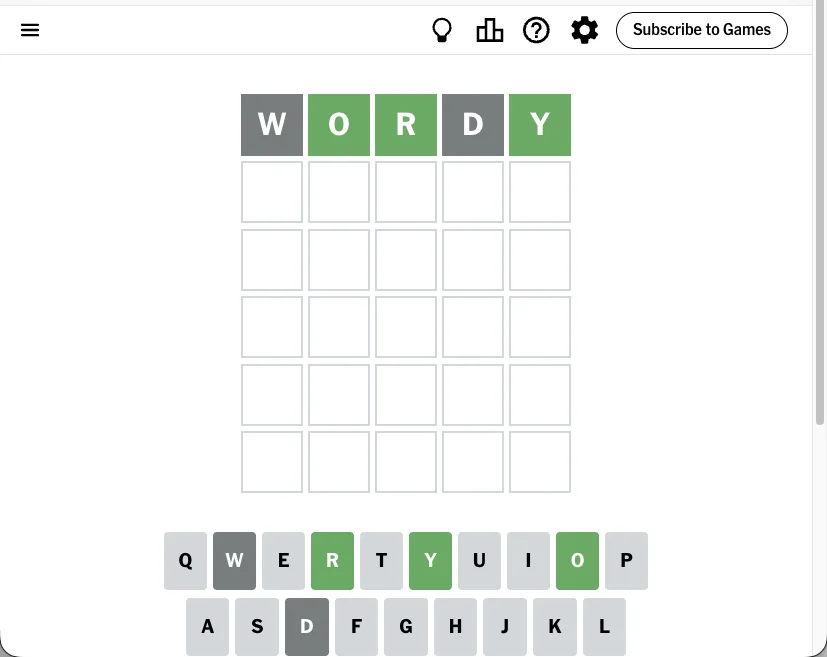
Three greens already: O, R, and Y are sitting in positions two, three, and five. W and D are out. So the answer is _OR_Y, and I need the first letter and the fourth letter. Sounds easy. It is not. There are a lot of words that fit that pattern, and most of them are the kind you half-remember from a crossword.
This is the moment the Wordle solver earns its keep.
Step 1: Retype Your Guess on the Board
Open wordlesolver.pro and click the Board tab. You get an empty grid that looks just like your game. Type your guess and every tile lands grey, which is convenient, because grey is the most common color in any real game.
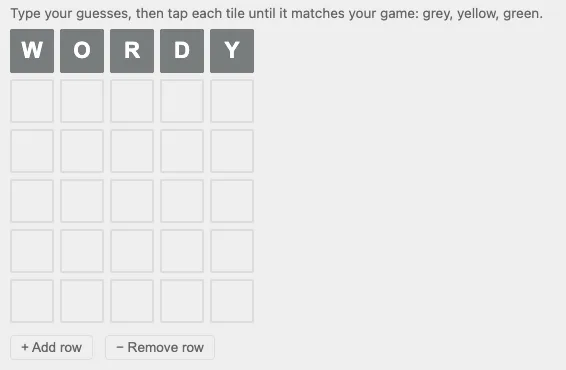
No dropdowns, no “put your green letters here” boxes. Just the word, exactly as you played it.
Step 2: Tap the Tiles to Match
Now the fun part. Tap any tile to cycle its color: grey, then yellow, then green, then back to grey. I tapped O, R, and Y until they turned green, and left W and D alone.
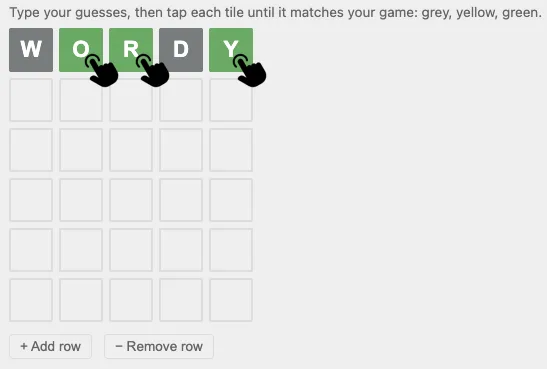
When the board on the site looks like the board in your game, you are done entering. That is the entire mental model: copy what you see. Nothing to translate, nothing to hold in your head.
Step 3: Press Solve and Read the List
One tap on Solve and the board solver hands back everything that fits:
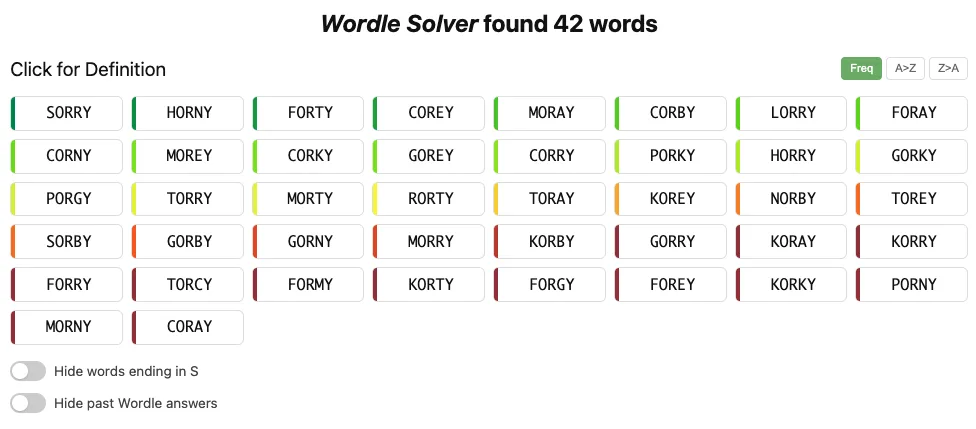
Forty-two candidates for _OR_Y, sorted by how common they are, each one clickable for a definition. SORRY, FORTY, MORAY, CORNY, HORNY, and a long tail of words I would never have surfaced on my own. This is where a solver beats staring at the ceiling: it does not get tired, and it does not forget that GORKY is a word.
The trick with a list this long is not to pick the “best” answer. It is to pick a guess that splits the field so the next result is much shorter. I grabbed FORTY, then MORAY, feeding each result back into the game.
Step 4: Repeat, and Watch the List Collapse
Every real guess is one more row on the board, so I just kept adding them. Type the word, tap the colors, and the solver folds the new information into everything it already knows.
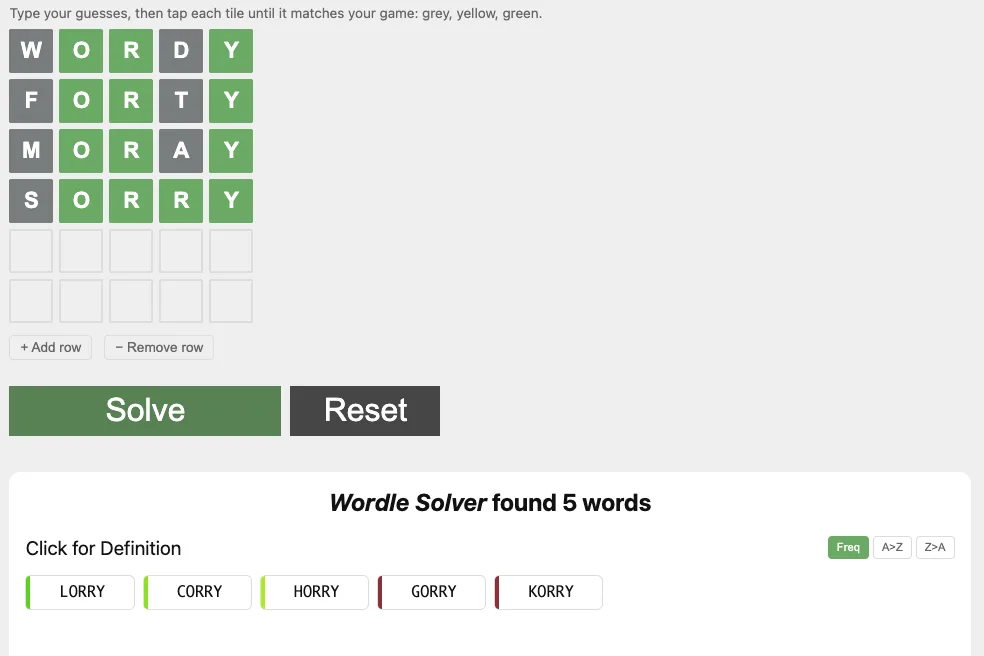
By the time SORRY went in, that fourth grey R had quietly turned green too, locking the pattern to _ORRY. Forty-two candidates became five: LORRY, CORRY, HORRY, GORRY, KORRY. Only one of them is a word an English speaker uses before breakfast.
Step 5: Solved
LORRY. All green.
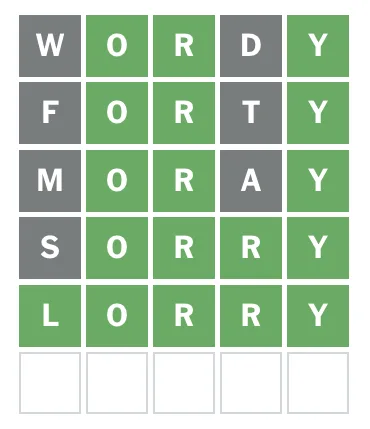
Five rows, one board, and a puzzle that felt unfair turned into a tidy little sequence of eliminations. The board solver did not guess for me. It just made sure I never wasted a guess on a word that could not possibly be the answer.
Why the Board Beats the Old Way
If you have used a solver before, you know the usual friction: greens go in one box, yellows in another, and everything grey gets typed into an “excluded letters” pile. It works, but it asks you to be the translator. Get one letter in the wrong box and your suggestions quietly go wrong.
The board solver removes that step entirely. A few things I love about it once you start:
- Duplicate letters just work. In this puzzle the double
Rin_ORRYwas handled automatically, no “how many R’s?” prompt to answer. The board reads repeats the way the game means them. - It is not only for five letters. Playing a longer variant? Press + Add row for extra guesses, and the same input works across every length we support, from the classic 5 letter word finder through the 6 letter, 7 letter, and 8 letter solvers, all the way up to 18.
- Switching is not a restart. Prefer the classic form for some clues? Flip over and your board arrives already translated, greens in the green row and all.
Try It on Today’s Puzzle
That is the whole workflow: copy your game, tap the colors, press Solve. Start here and click the Board tab:
- WordleSolver.pro - the solver and board mode
- Past Wordle Words - the full answer archive, updated daily
- Wordle Hint Today - for when you want a nudge, not the answer
And if the puzzle in front of you runs long, the 9 letter and 10 letter finders are one click from the same page.
Wordle is a trademark of The New York Times Company. This site is not affiliated with NYT.